Model report9 min read
Nano Banana 2.1 on Yihook: AI Image Generation & Editing
Nano Banana 2.1 is live on Yihook. Create and edit AI images with better visual design, consistent subjects, up to 10 references, and 1K, 2K, or 4K output.

Getting crisp text inside an AI image, preserving a product's hardware across multiple scenes, or blending several references into one cohesive shot usually takes too many frustrating retries. Nano Banana 2.1, Google's latest image generation model, addresses those exact friction points, and it is now live on Yihook across 1K, 2K, and 4K resolutions.
Google released Nano Banana 2.1 on October 6, 2026. Built on Gemini 3.6 Flash, the model reports improvements in prompt adherence, letterform precision, and subject consistency across edits. Google release notes
In day-to-day design work, the improvements show up in tangible ways: short headlines are more likely to spell correctly on the first attempt, products retain their distinguishing hardware, lighting stays cohesive across composites, and materials look like real surfaces instead of smoothed plastic.
Every sample in this guide was generated directly with Nano Banana 2.1. All people shown are fictional, and every editing walkthrough includes the exact input references used.
What Is Nano Banana 2.1?
Nano Banana 2.1 is Google's multimodal AI image generator and editor. In Google's technical documentation, it is cataloged as Gemini Nano Banana 2.1; on Yihook, you will find it in the model selector as NanoBanana 2.1. Grounded on the Gemini 3.6 Flash architecture, the model accepts both text prompts and image inputs to create original artwork or adjust existing assets. Google DeepMind model card
On Yihook, you can start from a clean slate with a text description or upload existing brand assets to adjust composition, lighting, style, and surroundings. Spin up a few directions, pick the most promising candidate, and refine the shot without starting from scratch.
Nano Banana 2.1 Image Generation and Editing: What's New?
Better Visual Design and Text Rendering
Rendering crisp text inside AI images used to mean dealing with garbled letters, strange glyphs, or awkward spacing. Nano Banana 2.1 brings noticeable improvements to letterform rendering and layout balance, allowing you to establish a working visual hierarchy on the first pass. Google model documentation, official 2.1 examples
That makes it a practical option for event flyers, social media cards, promotional graphics, and clean editorial concepts. In the exhibition poster below, the headline "SMALL FORMS" prints cleanly across the top banner, while the subtitle "CERAMICS WEEK" and schedule note "SATURDAY 10 AM" sit neatly within structured color blocks and comfortable margins.
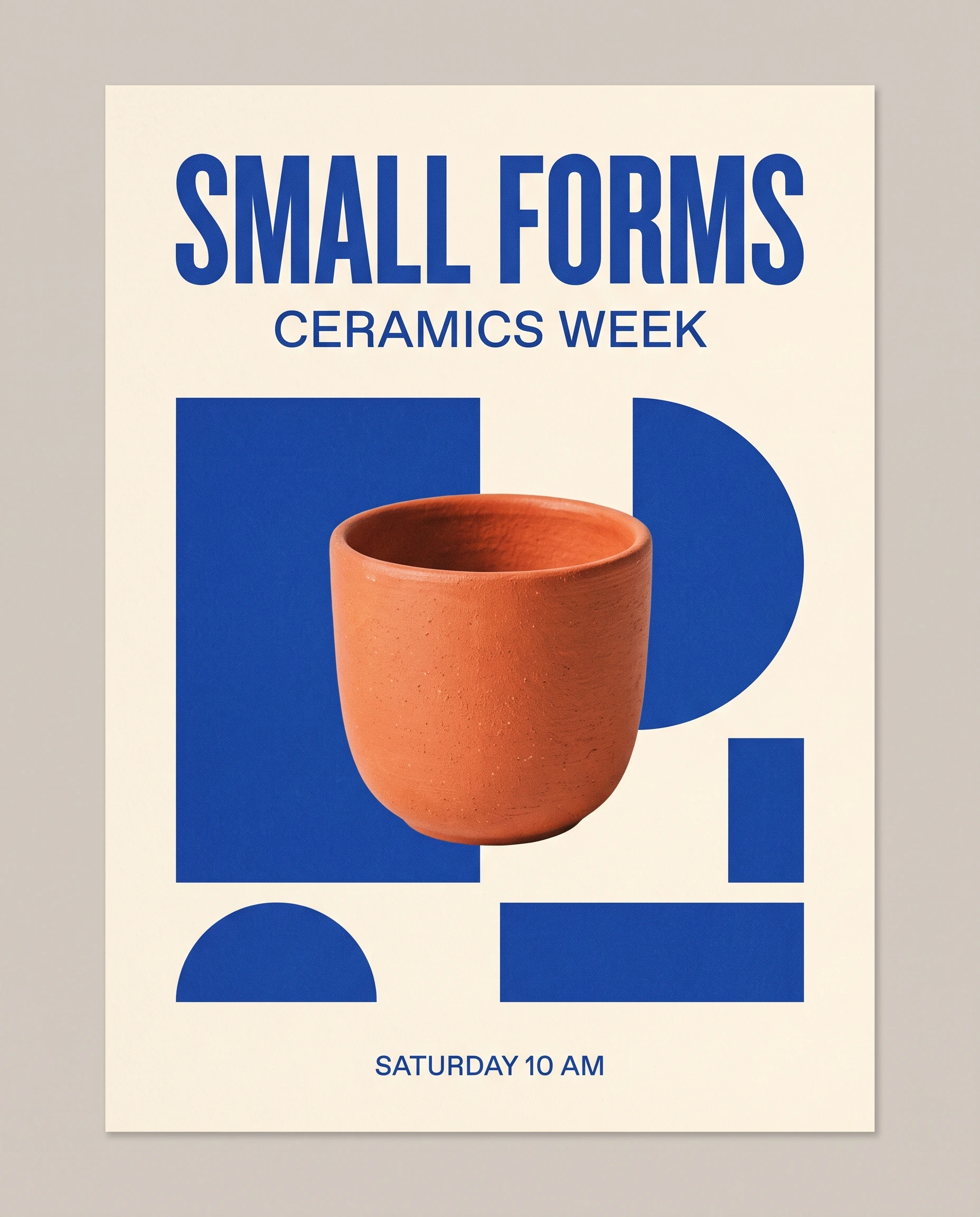
For the cleanest results, wrap exact words in quotation marks, specify where headlines and dates should sit, and leave intentional negative space. Short headings and badges are easier to get right on the first try, but small print and long paragraphs remain documented model limitations, so verify names, dates, and copy before publishing. Known model limitations
More Consistent People and Products
Building a cohesive campaign across multiple images usually breaks down when a generator drifts: a model's face shifts shape between frames, or a product loses distinct seams and hardware. Nano Banana 2.1 improves subject retention across iterations, making ongoing creative series more consistent; see the official evaluation table below for details. Official model card and evaluations, official 2.1 examples
In the test below, the two tiles on the left are the reference inputs: a fictional woman in a sage overshirt and a matte-blue insulated flask with a black cap and orange loop. The two tiles on the right show her in different settings: sitting in a sunlit courtyard and strolling along a coastal path at dusk. Her facial features, curly bob, and shirt stay consistent, while the flask retains its cylindrical body, cap shape, and orange accent.

This consistency helps ecommerce and marketing teams drop an established SKU into seasonal setups or sketch storyboards without rebuilding the character each time. Minor variations can still happen, so compare seams, branding, and facial details against your originals before signing off.
Stronger Editing with Multiple References
Most commercial briefs involve more than a single input: an approved model, a specific product SKU, and a distinct architectural setting often need to live in one frame. In Google's blind human evaluations, Nano Banana 2.1 scored higher in multi-reference editing than both Nano Banana 2 and Nano Banana Pro. Google DeepMind evaluation
On Yihook, you can attach up to 10 reference images in a single prompt. The most reliable workflow is assigning a distinct role to each input: "Reference 1 for the woman's appearance, reference 2 for the blue flask, and reference 3 for the courtyard layout and lighting palette."
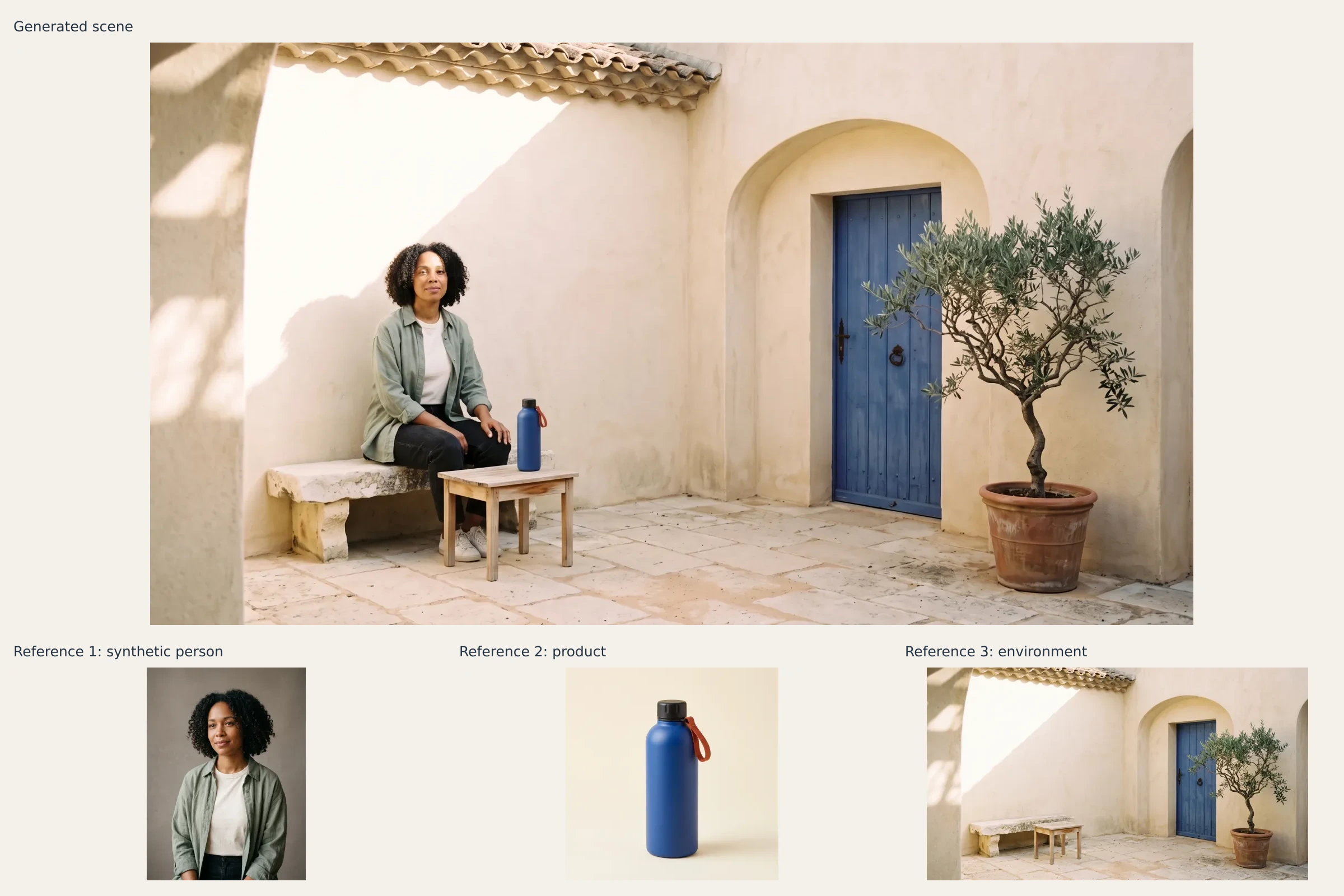
In the lifestyle scene above, the model unified all three inputs: the woman sits naturally by the courtyard table, the flask rests in the foreground, and low morning sunlight casts believable contact shadows across the limestone pavers.
More Natural Image Quality and Material Detail
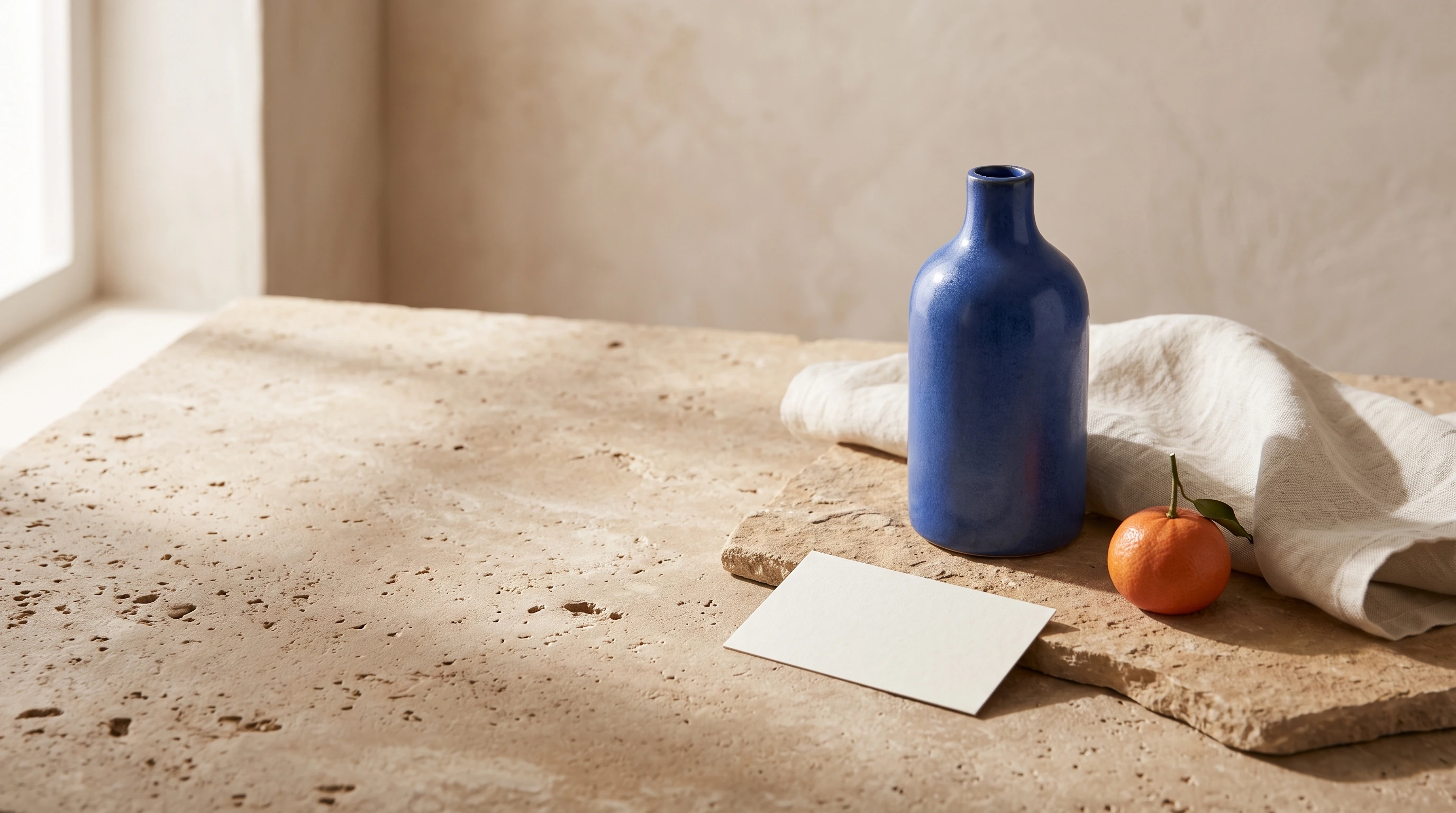
AI imagery often betrays itself with an over-smoothed, synthetic sheen: harsh specular reflections, plastic-looking skin, and blurry surface grains. Nano Banana 2.1 leans into softer light falloff and realistic tactile textures across 1K, 2K, and 4K outputs. Google model documentation, official 2.1 examples
Look closely at the 4K still life below: the gentle ripple in the ceramic glaze, the uneven weave of the linen runner, the weathered timber table, and the translucent citrus pulp glistening under diffused window light all hold up under scrutiny.

On Yihook, 2K provides a practical setting for drafting concepts and comparing compositions. Once you settle on an approved direction, generating at 4K provides the edge definition and textural depth needed for hero banners, packaging mockups, and large displays.
Nano Banana 2.1 vs Nano Banana 2 and Pro: What Changed?
To help creators evaluate the update objectively, the table below highlights five head-to-head categories published in Google DeepMind's October 2026 model card. Both Flash generations were evaluated under the Thinking condition, while the Pro column preserves Google's original benchmark label. The numbers represent Elo ratings derived from blind human side-by-side preference tests, complete with original uncertainty margins (±). Higher numbers indicate stronger human preference within each category. Official evaluation source
| Official Evaluation | Nano Banana 2.1 (Thinking) | Nano Banana 2 (Thinking) | Nano Banana Pro |
|---|---|---|---|
| Infographic Design | 1048 ± 17 | 961 ± 12 | 912 ± 12 |
| General Editing | 1026 ± 12 | 938 ± 11 | 939 ± 10 |
| Multi-Character Consistency | 1106 ± 14 | 978 ± 10 | 1011 ± 10 |
| Product Consistency | 1024 ± 18 | 955 ± 22 | 965 ± 14 |
| Multi-Reference Editing | 1066 ± 22 | 988 ± 13 | 989 ± 12 |
These scores indicate measurable progress in multi-character consistency (1106), multi-reference editing (1066), and infographic layout (1048). Keep in mind that these numbers reflect Google's side-by-side test conditions rather than guaranteed percentage gains or platform-wide benchmarks on Yihook, and "Thinking" describes Google's evaluation setup rather than an interface switch. If your day-to-day work involves multiple references or layout text, 2.1 provides a stronger baseline in these evaluated tasks.
What Can You Create with Nano Banana 2.1?
By combining consistent subjects, readable text, and multi-reference blending, Nano Banana 2.1 speeds up several essential creative workflows:
- Ecommerce product scenes: Place catalog items into styled living rooms, outdoor trails, or kitchen counters without arranging physical studio shoots.
- Event flyers and social cards: Build clean announcements, promotional graphics, and social posts with legible headings and balanced spacing.
- Brand campaigns and content suites: Keep character likenesses and product palettes consistent across a series of web banners and social assets.
- Storyboards and creative pitch decks: Combine talent and environment references to sketch believable narrative frames for client reviews.
- Visual explainers and infographic cards: Arrange concise data and talking points into clean editorial layouts ready for human review.

How to Use Nano Banana 2.1 on Yihook: 1K, 2K, and 4K
Getting started on Yihook takes just a few moments:
- Open the Yihook image generation workspace and select NanoBanana 2.1 from the model dropdown.
- Enter your creative prompt. Describe the subject, composition, environment, lighting, and wrap any required text in quotation marks.
- For reference editing, upload up to 10 reference images. Clearly assign a role to each input in your prompt (such as talent appearance, product shape, or scene backdrop).
- Select your resolution (1K, 2K, or 4K, with 2K as the default) and pick an aspect ratio (default 1:1).
- Choose how many images to generate (1–9 images per run). Review your batch, select the strongest variant, and iterate further.
Yihook supports 10 aspect ratios tailored for contemporary media formats:
| Aspect Ratio | Possible Uses |
|---|---|
| 1:1 | Square visuals and product cards |
| 2:3 | Portrait posters and people photography |
| 3:2 | Landscape photography and product scenes |
| 3:4 | Portrait covers and editorial imagery |
| 4:3 | Presentation visuals and landscape content cards |
| 4:5 | Portrait feed assets |
| 5:4 | Landscape feed assets |
| 9:16 | Vertical content and story covers |
| 16:9 | Landscape covers and video storyboards |
| 21:9 | Wide scenes and panoramic key visuals |
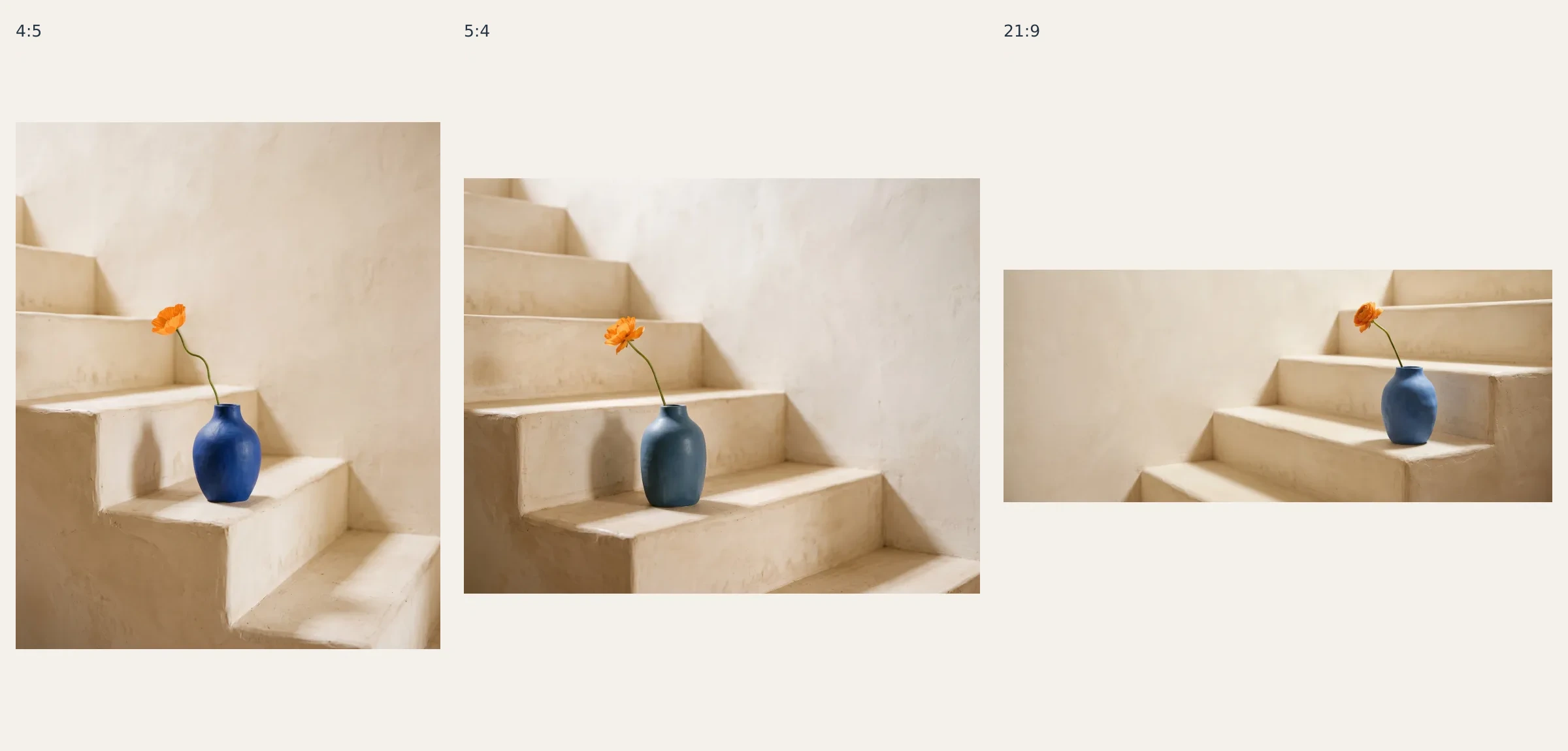
Instead of stretching or arbitrarily cropping a single image, the model recomposes the scene for each aspect ratio. In the three examples above, the blue vase and orange blossom shift their placement, scale, and negative space naturally across 4:5, 5:4, and 21:9 canvases.
Ready to see how it handles your creative briefs? Open Yihook's image generation workspace and run your first prompt with Nano Banana 2.1.
Frequently Asked Questions
What's the Difference Between Nano Banana 2.1 and Nano Banana 2?
Nano Banana 2.1 improves text rendering, prompt adherence, and multi-round subject retention over its predecessor. While high resolution and multi-image references were already available in version 2, 2.1 provides tighter control when composing scenes from multiple inputs or placing headings inside graphics; see Google's Elo ratings above for category-specific scores. Google release notes
What's the Difference Between Nano Banana 2.1 and Nano Banana Pro?
They represent different models within the Gemini family. Nano Banana 2.1 is built on Gemini 3.6 Flash, focusing on prompt adherence, layout text, and multi-reference editing. Nano Banana Pro is another standalone model from Google. In Google's October 2026 model card, 2.1 under the Thinking condition scored higher in infographic design, subject retention, and multi-reference editing, though Pro remains an option in Google's lineup. Testing your own assets side by side is the best way to choose. Google model guide
Can Nano Banana 2.1 Output 4K?
Yes. Yihook offers 1K, 2K, and 4K resolution options, with 2K set as the default. Output dimensions adjust automatically to match your selected aspect ratio (for example, a 1:1 square render at 4K yields 4096 × 4096 pixels). You can generate between 1 and 9 images per submission across 10 available aspect ratios. Custom pixel dimensions and 0.5K are not supported.
How Many Reference Images Can I Use on Yihook?
You can upload up to 10 reference images per generation on Yihook. Use them to establish a character's features, a product's dimensions, an architectural setting, or a color palette, and specify each image's role in your text prompt. A solid working habit is starting with 2 to 3 core references to lock down your layout before adding extra requirements.
Does Nano Banana 2.1 Add a Watermark?
Generated images do not carry visible corner logos, stamps, or watermarks. However, all generated files contain an invisible SynthID digital watermark, which is an embedded digital signature used to identify AI-generated media. Google image generation guide, SynthID documentation
Ready to try it?
Put this playbook to workon your next piece.
Every prompt and workflow above runs as-is on the Yihook canvas. Start from a product shot or an idea, make the visuals and videos, and keep what works for your team.